Introduction
A scene can look expensive and still feel fake in one cut. Picture a tense rooftop exchange: the courier begins beside the antenna mast, the captain blocks the stair door, and a red signal case sits between them. The next angle is sharper, but the courier has jumped to the other side of the mast, the captain is now near the railing, and the case has drifted behind both characters. The viewer spots the problem immediately. The creator who has been staring at single takes often misses it.
That is the trap with character blocking consistency. AI anime tools can give you impressive isolated frames, but a scene is not judged as isolated frames. It is judged as space, relationship, pressure, and movement. If the character on frame left becomes frame right without a reason, the audience may not describe it as a blocking error, but they feel the scene break.
Character blocking is the plan for where characters stand, where they face, how they move, and which camera side is allowed. In AI anime, every new generation may reinterpret the room.
Use this guide when a dialogue scene, confrontation, chase pause, reveal, or group shot needs to survive multiple shots. Start in Creative Worlds, keep identity stable with Character Sheet References, and use Three-Shot Continuity Board for hook, reaction, and reveal.
Core Principles
Blocking is story information. A character near the exit has a different status from one trapped behind a desk. A character higher on a stair owns the frame differently from someone below. Put the power relationship into the map.
The first and last frames matter more than the prettiest middle frame. If shot one ends with the heroine on screen right facing left, shot two should respect that unless the story shows her crossing.
Use fixed anchors that are not characters. A table, doorway, railing, lamp, case, signpost, or stair line gives the viewer a stable object to measure against.
Choose a camera side before writing beauty language. If two characters face each other across a counter, decide which side the camera may occupy. Crossing the axis without a transition makes conversation feel scrambled.
Separate standing position from body action. "Nara stays left foreground" is a position rule. "Nara reaches for the signal case" is an action rule. When they are mixed into one long sentence, the model may keep the action and forget the position.
Keep the blocking map smaller than the prompt. Three positions and three cameras are enough for most short scenes.
Review blocking before polish. A beautiful render with flipped positions is still a failed scene. Approve the room logic, then spend final quality on the selected take.
Step-by-Step Character Blocking Consistency Method
Start with the dramatic relationship. Write one sentence: "Rysa guards the exit while Kael tries to reach the signal case." This tells the blocking what it must express.
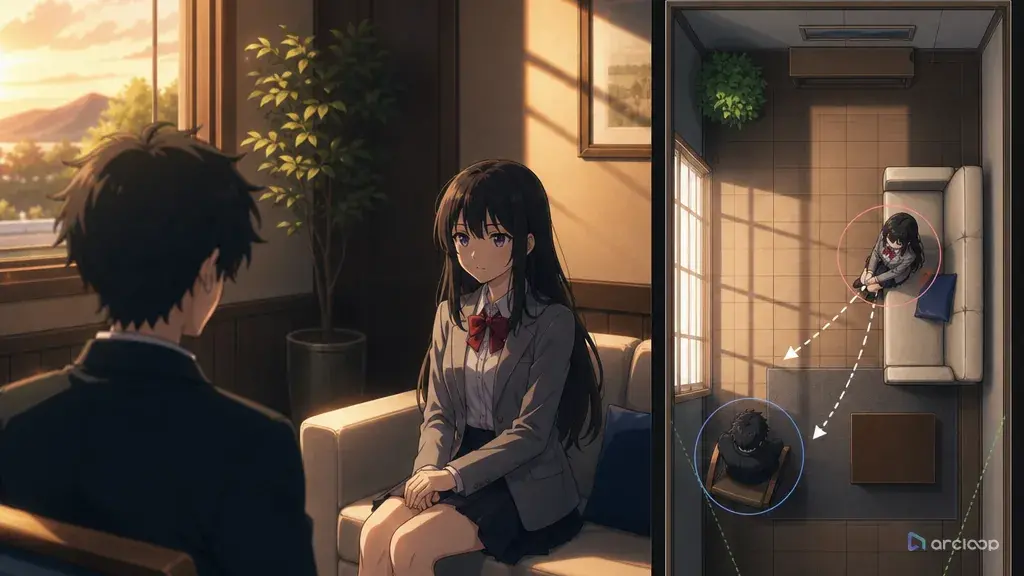
Draw or describe a top-down map. It can be plain text: exit at north wall, table center, signal case on table, Rysa north of table, Kael south of table, window east. Use labels that are easy to repeat.
Assign character positions. Give each character a stable code such as C1 and C2, then attach name, role, side, and facing direction. For vertical shorts, include foreground/background because depth affects subtitles and face readability.
Mark camera positions. Camera A may be wide from the window side, Camera B close on Kael, and Camera C over Rysa's shoulder. Remove angles that cross the axis unless the crossing is intentional.
Choose anchor props. A red case, blue lamp, broken chair, or glowing floor seal can hold continuity better than background description. Repeat the anchor in every shot prompt.
Break the scene into shot jobs: relationship, pressure, decision, reveal. A shot that relocates characters, reveals a prop, changes expression, and moves the camera at once will often fail.
Write each shot prompt from the same map. Reference the map, camera, character codes, positions, and anchor props. Change only the action and shot size.
Review the cut on edges. Compare each last frame with the next first frame. Check side, facing direction, prop location, eye line, and camera side.
When a shot fails, repair the smallest layer. If the character identity is right but the side is wrong, fix the side rule. If the prop jumps, strengthen the prop anchor. If the camera crosses the axis, remove that angle instead of rewriting the entire scene.
Where Blocking Belongs: In the Shot, Not the Asset
This is the split that keeps blocking stable. Who they are lives in the character asset — face, costume, props, voice — and enters a shot through an @ reference. Where they stand is shot-level information and belongs in the shot description, because it changes every time. Pushing blocking into the asset backfires: it starts carrying a position it has no business remembering.
Create one project space in Creative Worlds. Store the character references, top-down blocking note, shot list, and review decisions together. Use Character Sheet References for identity and AI Short Drama guides for hook timing and subtitle space.
The review order is simple: identity, blocking, eye line, action, then polish. Detail cannot fix a scrambled room.
For multi-shot work, keep a small rejection note beside the selected take. "Reject if Kael moves north of the table before shot three" is better than "keep scene consistent."
Example prompt 1: Rooftop Signal Case Blocking
Create a four-shot AI anime blocking plan for an original rooftop confrontation.

Characters:
C1 Nara, exhausted message courier, amber scarf, navy field coat, left cheek scratch.
C2 Veyr, city watch captain, white rain cape, square silver badge, controlled posture.

Scene map:
Rectangular rooftop at dusk. Stair door on north wall. Antenna mast center-left. Red signal case on a low utility crate center. Railing along south edge.

Blocking rule:
Nara begins south of the crate, screen right when seen from Camera A, facing north-west toward Veyr. Veyr stands north of the crate near the stair door, screen left from Camera A, facing south-east. The red signal case stays on the crate until shot 4.

Cameras:
Camera A wide from south-east, shows both characters and stair door.
Camera B close on Nara from south side, Veyr shoulder soft foreground left.
Camera C close on Veyr from north side, Nara shoulder soft foreground right, do not cross the crate axis.
Camera D insert on red signal case, hands enter from correct sides only.

Output:
Write shot prompts for a 16-second scene: wide relationship, Nara pressure close-up, Veyr refusal close-up, signal case insert. Preserve left-right roles, facing direction, mast position, stair door, and case location.
This prompt makes spatial memory part of the deliverable. The camera can change without letting characters trade places.
Example prompt 2: Clockwork Tea Shop Counter
Create a 12-second AI anime dialogue scene from one blocking map.

Original characters:
Pavo, nervous apprentice clockmaker, round copper glasses, green work apron, small winding key necklace.
Selle, calm tea shop owner, silver braid, black sleeve guards, porcelain cup in left hand.

Location:
Tiny clockwork tea shop. Service counter runs left to right across the middle. Wall of ticking clocks behind Selle. Customer aisle in front of Pavo. Brass register fixed at counter center.

Position map:
Pavo stays in the customer aisle on the near side of the counter, frame left in the wide shot, facing right toward Selle. Selle stays behind the counter, frame right in the wide shot, facing left toward Pavo. The brass register remains between them as the anchor object.

Shot list:
1. Wide two-shot from customer side, both faces readable, register centered.
2. Medium close on Pavo from near-left, register edge visible lower right.
3. Medium close on Selle from behind-counter side, Pavo shoulder soft foreground left, clocks still behind Selle.
4. Insert of Selle placing the porcelain cup beside the register, cup enters from right, Pavo's hand waits from left.

Negative constraints:
No swapped sides, no counter disappearing, no new doorway, no overhead reset, no register moving, no cup changing color, no camera crossing behind Pavo.
This example uses the counter as a hard spatial boundary. The viewer always knows who belongs on each side.
Example prompt 3: Flooded Archive Stairwell Review
Review and repair blocking for a three-shot AI anime sequence.

Scene:
A flooded archive stairwell under emergency blue lights.

Original characters:
Marek, field medic with cropped brown hair, orange rescue vest, waterproof satchel.
Tella, rival archivist with black bob hair, violet utility cloak, brass document tube.

Approved blocking:
Marek stands on the lower step, screen left, water at his boots, facing up-right.
Tella stands three steps above him, screen right, one hand on the rail, facing down-left.
The brass document tube is clipped to Tella's belt on her right side.
The broken wall light is above Marek on frame left.

Task:
Given three generated shots, write a blocking repair prompt that preserves the approved positions. Keep Marek lower and left. Keep Tella higher and right. Keep the stair rail on Tella's side. Keep the blue emergency light above Marek. The repair may improve face clarity and hand pose, but it must not swap height, side, document tube, or rail position.

Output format:
1. Pass-fail checklist.
2. Smallest repair prompt.
3. Shots that must be regenerated instead of repaired.
This prompt is for the review pass. It prevents a repair job from accidentally rebuilding the whole stairwell.
Common Mistakes
The easiest mistake is writing "two characters argue in a room" and expecting the room to stay coherent. A room needs sides, exits, anchors, and cameras.
Another mistake is using reverse angles without an axis rule. Reverse angles work only when the audience can still tell who is on which side.
Creators often approve the most detailed take instead of the most editable take. A less polished shot with correct blocking is usually a better base than a gorgeous shot that flips the scene.
A fourth mistake is letting props float. If the case, cup, letter, phone, or weapon matters, give it a fixed location and a fixed owner. Otherwise it may migrate every time the camera changes.
Some scenes fail because the character moves without a transition. If someone crosses from left to right, show the crossing or reserve it for a new beat. Do not let the edit imply teleporting.
Finally, do not use one huge prompt for an entire conversation unless the workflow keeps shot state. Separate shot cards are easier to review and cut.
FAQ
What is character blocking in AI anime?
Character blocking is the plan for where characters stand, face, move, and relate to objects and cameras. It helps separate shots feel like one scene.
Do I need a drawn floor plan?
No. A text map is enough for many scenes. Write location, anchors, character positions, facing directions, and allowed camera sides.
How many camera positions should I use?
Use two or three for a short dialogue scene. Add more only when the scene needs a clear change in power, reveal, or movement.
What should I check before final render?
Check identity, left-right position, depth, facing direction, prop location, eye line, and whether the camera crossed the axis.
How do I keep blocking consistent across shots?
Reference the same character assets in every shot so identity never re-rolls, then write the spatial relationship explicitly in each shot description — who is screen-left, who is screen-right, who is closer to camera. When a shot comes back wrong, you regenerate that one shot instead of restarting the scene, because the identity layer was never the thing that broke.