Introduction: When the Clip Works but the Feed Version Fails
The finished AI anime shot looks good on your desktop timeline. The character's face is clean, the action reads, and the last frame has a nice emotional hold. Then you post it in different formats and the problems appear immediately. The vertical crop cuts off the prop. The square preview hides the reveal. The caption covers the character's hands. The loop restarts on a dead frame. The cover still looks like a random in-between instead of a reason to tap.
Cross-platform distribution is not just exporting the same file in several sizes. Short video platform adaptation starts earlier, while the shot is still being planned. A clip that needs to work in a vertical feed, a square grid, a horizontal embed, a silent autoplay surface, and a looped preview needs deliberate hook timing, crop-safe staging, caption zones, cover frames, and final holds.
This guide explains how to plan platform adaptation for AI anime inside ArcLoop without sending the creative work elsewhere for strategy. Aspect ratio is set once, in the Story Brief — 16:9 or 9:16 — so decide the primary platform before you build shots. Turning a horizontal Storyboard into a vertical cut later means re-cutting shots in Edit, not just re-exporting the same file. For reusable references, start with Workflow Templates, then keep the project in ArcLoop Worlds.
Core Principles for Cross-Platform Distribution
Design the first second as a visual hook. The hook does not need text or gimmicks. It can be a strange object, a clear pose, a near-impact frame, an emotional face, a magical rule, or a camera reveal. If nothing meaningful appears until second four, many short surfaces will bury the work before the story begins.
Keep the important action inside a crop-safe zone. In vertical formats, faces and hands often need to live near the center. In square previews, wide background staging may disappear. In horizontal embeds, tall props may get clipped. Write the crop rule before generation so the shot does not depend on empty edges.
Plan the caption lane. Captions, subtitles, titles, and UI overlays should not cover faces, hands, props, or the reveal object. Even if you publish a clean version, a caption-safe lower or upper band helps when the clip travels through different surfaces.
Choose a loop point deliberately. Some clips loop on a repeated motion, such as a lantern flicker or character turn. Others need a final hold that invites replay. A bad loop point makes a good shot feel unfinished.
Separate master shot from platform cuts. The master clip protects story and continuity. The platform cuts adjust crop, cover, opening frame, caption placement, and duration. Do not let one platform crop rewrite the character design or world rule.
Make the cover frame part of production. A cover still should show the character, conflict, or mystery in one readable composition. Waiting until export to pick a cover often leaves only blurry motion frames.
Step-by-Step Platform Adaptation Workflow
Start with the master intent. Write what the clip must communicate before platform rules: "A courier chef realizes the floating noodle cart is leaving without him" or "A trainee witch hides a cracked charm before the teacher enters." This prevents format work from flattening the story.
ArcLoop doesn't have a separate planning grid for this — the aspect ratio decision happens once, in the Story Brief. If you need both a vertical and a horizontal cut, treat them as two exports from the same Episode: keep the shots the same, and use Edit's trim and duration controls to produce the version each platform needs. Note the safe-crop area and final-hold frame for each version before you cut.
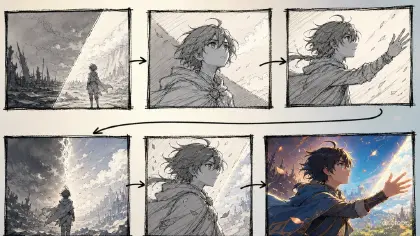
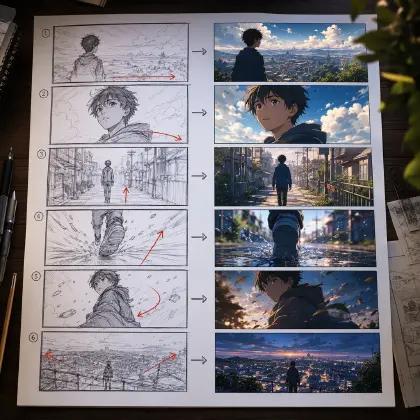
Build the storyboard around the hook and hold. A 7-second short might use second 0-1 for the hook image, second 1-4 for the action, second 4-6 for the reveal, and second 6-7 for a clean final hold. Use Storyboard Hook to Reveal if you need a compact planning template.
Write the shot prompt with crop-safe staging. Mention where the face, hands, prop, and reveal object sit in frame. Add "leave clean space for captions" only if the scene can support it without becoming empty.
Generate a small slate before final exports. Review three things before polish: does the story still read without sound, does the vertical crop preserve the main action, and does one frame work as a cover?
Make platform-specific revisions after the master works. If the master clip is good but the square crop fails, revise crop and cover only. If the loop fails, revise ending motion and final hold only. Keep the character sheet, palette, and story beat locked.
Log the publishable package. Save the master, cutdown notes, cover frame, caption lane, and rejection notes together so the next episode starts from the approved distribution pattern.
Where the Platform Decision Actually Lives
ArcLoop is useful here because the platform decision doesn't live outside the pipeline. The Story Outline breaks into Episodes, each Episode breaks into a Storyboard of Shots, and the aspect ratio set in the Story Brief carries through every one of those shots automatically. When a shot needs reframing for a different platform, you regenerate that shot in place — there's no separate distribution plan to keep in sync.
For character-heavy clips, connect the platform matrix to the character sheet. If the character's expression sells the hook, the crop must protect the face. If the prop sells the reveal, the hands and prop must stay visible. If the world rule sells the series, the background cannot disappear entirely in vertical format.
For series work, pair this with Batch-Producing an Anime Series. The same character may need different openings across surfaces, but the identity anchors and world rules should not change. When selecting versions, use The Take Selection Workflow so the "best-looking" take does not beat the take that actually survives distribution.
Example Prompt 1: Platform Matrix for a Rooftop Noodle Cart Short
Medium wide shot of @Jun Pavo gripping the cart handle as steam lifts the noodle cart off the rooftop rail, brass bell swinging against his hip, moss-green hair catching the dusk light. His panic breaks into a grin as he plants his feet and jumps onto the drifting cart. Camera holds low and center-weighted, keeping his face, hands, the brass bell, and the cart silhouette inside a vertical-safe frame so the shot still reads after a crop to 9:16, with the steam trail left loose in the background so the same take also cuts cleanly for a wider 16:9 version.
This prompt turns distribution into a production board. It captures the merged intent: cross-platform packaging and short video adaptation before generation.
Example Prompt 2: Crop-Safe Master Shot
Use the approved Steam Bell Delivery platform board and Jun Pavo character sheet. Create a 7-second 2D anime master shot on a twilight rooftop food alley. Camera: vertical-safe medium wide shot, Jun centered slightly above the middle, cart handle and brass bell visible in the lower center, open sky above the steam trail. Beat timing: second 0-1, the brass bell rattles and catches the eye; second 1-3, steam lifts the noodle cart wheels off the roof; second 3-5, Jun grabs the handle with both hands and plants one foot on the ledge; second 5-7, he grins and jumps with the cart, ending on a readable airborne hold. Leave a clean lower-left caption lane without hiding hands. Keep colors, outfit, cart shape, and bell position consistent. No cropped prop, no face drift, no extra fingers, no text, no watermark, no random camera spin.
The shot is built to survive adaptation. The hook, crop, caption lane, and final hold are part of the prompt instead of afterthoughts.
Example Prompt 3: Square Preview and Loop Revision
Revise the selected Steam Bell Delivery take for square preview and loop preview while preserving the approved master shot. Keep Jun's moss-green hair, cream headband, navy vest, rolled sleeves, brass soup bell, rooftop alley, and steam-lifted noodle cart. Current issue: the vertical master works, but the square crop loses the bell and the loop restarts on an empty sky frame. Change only platform adaptation details. Reframe so Jun's face, both hands, the brass bell, and the front half of the cart remain visible in a centered square crop. Adjust the ending so the final airborne hold has the steam curling back toward the opening bell frame, making the loop feel intentional. Keep duration near 6 seconds. No new joke, no costume redesign, no text overlay, no logo, no added characters.
This revision absorbs platform-specific failure without rebuilding the story. The master identity stays intact while square and loop needs get fixed.
Common Mistakes in Cross-Platform Distribution
The biggest mistake is treating distribution as a final export chore. If the shot was never staged for vertical crop, silent viewing, cover selection, or loop behavior, exports only reveal the damage.
Another mistake is making the caption lane fight the action. If the hands, mouth, or reveal prop are in the same area where captions will sit, the platform version becomes harder to watch.
Creators also choose cover frames too late. Motion in-betweens often look soft, odd, or confusing as thumbnails. Plan a hold or readable pose that can become the cover.
A fourth mistake is optimizing every surface with a new creative idea. Platform adaptation should adjust presentation, not replace the scene. When each cut changes the joke, prop, palette, or character pose, the series feels scattered.
Finally, do not rely on sound to explain the first beat. Many short surfaces start muted. The opening frame should communicate character, action, or curiosity visually.
FAQ About Cross-Platform Distribution
What is short video platform adaptation for AI anime?
It is the process of shaping an anime clip so it works across vertical feeds, square previews, horizontal embeds, covers, captions, and loops while preserving the same character and story beat.
Should I make one master clip or separate clips for every platform?
Start with one master clip that protects story and continuity. Then make narrow platform revisions for crop, cover, caption lane, duration, and loop point. Separate creative versions are useful only when the surface truly needs a different beat.
How do I choose a cover frame?
Pick a frame where the character, conflict, or mystery is readable at small size. Faces, hands, props, and strong silhouettes usually work better than busy action blur.
How do I lock in aspect ratio and crop before I generate?
Set it in the Story Brief before you build shots — 16:9 or 9:16, chosen once per project. Reference the same character assets in every shot so identity survives any crop, then use Edit to trim and reorder footage into the version each platform needs before you Export.
What should I fix when a clip performs badly after reposting?
Diagnose the surface failure first. If the crop hides the reveal, revise framing. If viewers miss the opening, strengthen the first second. If the loop feels abrupt, repair the ending hold. Keep the approved character and story intact unless they are the actual problem.