Introduction: Time Skips That Still Read as One Character
Age-span design breaks fast in AI anime. A child version of the hero looks charming, the teenage version looks like a different lead, and the adult version comes back with new eye shape, new hair logic, new posture, and a completely unrelated costume palette. The story says "ten years later," but the viewer reads "new character."
The opposite failure is just as distracting. The model keeps the exact same face, outfit, and body proportions across every age, so the character looks like a child wearing an adult uniform or an adult with no life history. A believable age span needs both continuity and change.
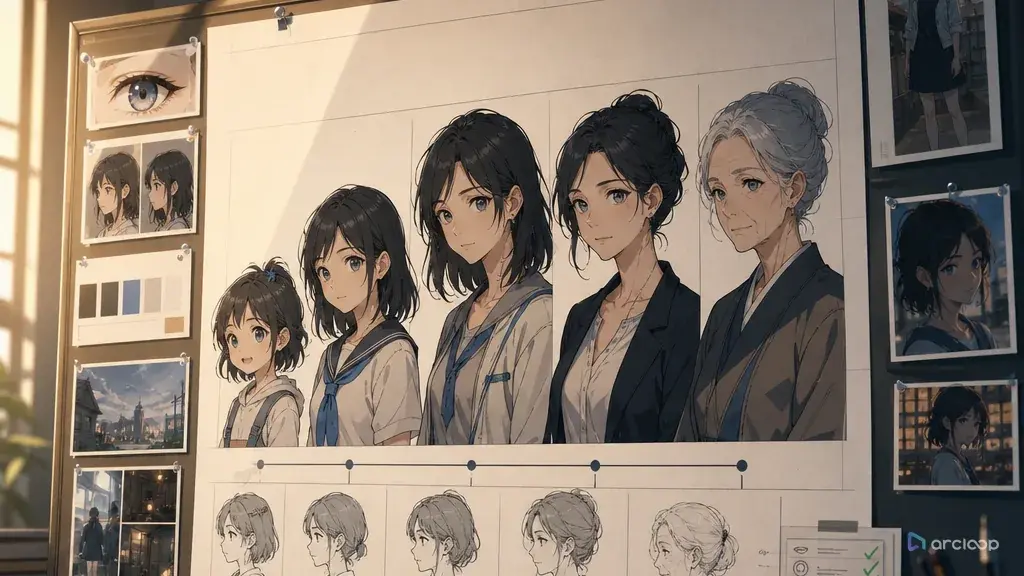
An age-span sheet solves that by separating persistent identity anchors from age-specific features. Eye shape, brow rhythm, birthmark, signature gesture, color relationship, or a personal object may persist. Face fullness, height, hairstyle complexity, clothing function, posture, and voice delivery may evolve. The sheet should say which is which before any shot is generated.
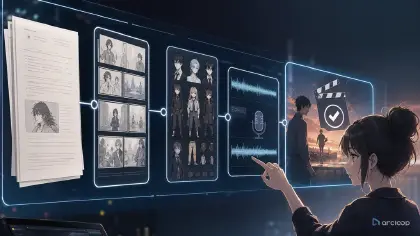
Age span is exactly the kind of thing that belongs in My Assets rather than in a prompt you retype each time. A character asset holds the name, description, main image, reference images, and voice — and once it exists, every later shot can pull all of that in with a single @ reference. Start from character profile fields, keep the surrounding story in ArcLoop Worlds, and use continuity checks when flashbacks and time skips land in the same short.
Core Principles for AI Anime Character Age Span
Choose persistent anchors that can survive redesign. A small crescent scar near the left eyebrow, triangular eye shape, asymmetrical bangs, a shell bracelet, or a habit of touching the collar can stay recognizable even when the character grows taller or changes clothes.
Decide what must age. A seven-year-old, seventeen-year-old, and thirty-two-year-old should not share the same body proportions, jaw definition, hand size, posture, clothing fit, or emotional restraint. If nothing evolves, the time skip feels fake.
Keep the color relationship stable, not necessarily the exact outfit. A child may wear a yellow rain poncho, a teen may carry yellow shoelaces, and an adult may keep a muted ochre scarf. The audience gets continuity without forcing identical clothing.
Tie age changes to life events. Do not only write "older version." Explain what changed: academy training, injury, rank, exile, work, parenthood, grief, success, or a new social role. The design should show lived time.
Use age-appropriate framing and action. A child version may reach up to a workbench, a teen may sprint through a gate, and an adult may pause before entering the same room. The shot should communicate age through behavior, not only face shape.
Avoid celebrity or product names as shortcuts. Age-span design for original characters should come from your own anchors, not from known characters or brands. Once those anchors are bound to a character asset as reference images, they stay put — the model reads them instead of re-inventing a face from your wording each time.
Step-by-Step Age-Span Design Workflow
Start with the character's core identity. Write the trait that remains across age: stubborn optimism, precise observation, fear of open water, refusal to throw away broken tools. This emotional anchor guides visual continuity.
Create three or four age cards. Most projects need child, teen, adult, and sometimes elder. For each age, list body proportion, face shape, hair, clothing function, signature prop, posture, voice direction, and emotional default.
Mark persistent anchors in a separate row. Do not bury them inside paragraphs. Use a clear list: left eyebrow crescent scar, dark teal eyes, two-step thinking pause, shell bracelet, right-handed sketching.
Mark evolving features separately. Hair length, clothing complexity, height, shoulder width, hand shape, makeup, uniform rank, tool wear, and speaking pace may all change. The reviewer should know these changes are intentional.
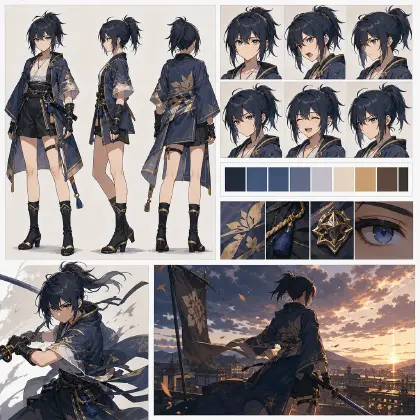
Build comparison shots before story shots. Generate a simple front-facing age lineup or character reference board first. Then generate narrative scenes. If the age cards fail in a neutral comparison, they will drift harder in motion.
Test time-skip recognition. Show the same character in two different ages performing a related action: child sketching a boat, teen repairing a sail, adult designing an airship rudder. The action relationship helps viewers connect the versions.
Save the age-span sheet as the reference for future prompts. Every flashback, memory, poster, dialogue scene, and final episode should pull from the same age logic.
Building an Age Span in My Assets
The practical question is whether one character asset covers the whole age range, or whether each age gets its own. Rule of thumb: if two ages share an episode and you need to point at them separately, make them separate assets — @Iven Arlo (child) and @Iven Arlo (adult) — because an @ reference has to resolve to one thing. If the shift is gradual and never shares a shot, one asset with a reference image per stage is enough.
Use Character Sheet Templates for the age cards, then add a timeline row for each version. Use Storyboard Continuity when a flashback cuts directly into the present. Use AI Character Voice Is a Story Layer if the same character speaks at different ages; younger pacing, adult restraint, and elder breath control should be planned, not guessed later.
The reason this matters more for age span than for a normal character: a late voice or costume decision can quietly contradict the timeline. If the age anchors live in a character asset, the contradiction shows up the moment you look at the asset. If they only live in prompt text scattered across shots, nobody notices until the cut is assembled.
Review age-span shots in this order: same-character recognition, intentional age change, story timeline, action readability, then polish. Do not approve a beautiful adult design if the persistent anchors disappeared.
Example prompt 1: Age-Span Sheet for Iven Arlo
Create a character asset for an original 2D anime character named Iven Arlo, adult stage.

Core identity: Iven studies broken machines because he believes every object deserves a second use. Across all ages, he pauses before answering, looks down-left when thinking, and repairs things with his left hand.
Persistent visual anchors: dark teal eyes, crescent scar near left eyebrow, thick upward eyebrows, small shell bracelet on left wrist, warm gray-and-yellow color relationship, left-handed tool use.
Age cards:
Age 8: short round face, messy dark hair, oversized yellow rain poncho, bare knees, patched sandals, carries a cracked toy compass.
Age 17: leaner face, longer side-swept hair tied with a gray cord, cropped workshop jacket, yellow shoelaces, tool roll at hip, quick guarded posture.
Age 34: sharper jaw, shorter practical hair, gray engineer coat with muted ochre scarf, repaired shell bracelet, calm shoulders, worn drafting gloves.
Review rule: each age must read as Iven, but body proportion, clothing function, and confidence should evolve clearly.
Negative constraints: no identical outfit across ages, no new eye color, no missing scar, no right-handed repair pose, no famous character resemblance, no logo.
Written this way, the description states what persists and what changes, so it holds up when the asset is referenced from a shot. It does not lean on "young version" and "older version" alone.
Example prompt 2: Time-Skip Recognition Shot
Generate an 8-second 2D anime time-skip comparison shot using Iven Arlo's age-span sheet.

Composition: split-memory layout without text. Left side shows Iven at age 8 kneeling under a fishing pier at low tide, holding a cracked toy compass in his left hand. Right side shows Iven at age 34 in an airship repair bay, holding a full-size navigation gyroscope in the same left-handed grip.
Camera: steady medium shot on both sides, matching hand position and down-left thinking glance, no camera shake.
Visual continuity: dark teal eyes, crescent scar near left eyebrow, thick upward eyebrows, shell bracelet on left wrist, gray-and-yellow color relationship.
Age differences: child version has round cheeks, oversized yellow poncho, patched sandals, nervous curiosity; adult version has sharper jaw, muted ochre scarf, gray engineer coat, drafting gloves, quiet confidence.
Style: clean 2D anime line art, soft coastal light on the left, warm workshop light on the right, subtle dust and sea mist.
Negative constraints: no text labels, no logo, no identical face proportions, no missing bracelet, no right-handed pose, no extra characters, no sudden style shift.
The mirrored action helps the viewer connect the ages while the design still grows.
Example prompt 3: Revising an Adult Version That Lost Identity
Revise Iven Arlo adult-age take IA-34-02 using the approved age-span sheet.

Approved: airship repair bay, gray engineer coat, muted ochre scarf, drafting gloves, calm adult posture, warm workshop lighting.
Problem: the adult version lost Iven's crescent eyebrow scar and shell bracelet, and his eyes became pale blue, so he no longer reads as the same character from the flashback.
Single correction: restore dark teal eyes, crescent scar near left eyebrow, thick upward eyebrows, and repaired shell bracelet on the left wrist while keeping the adult face structure and engineer costume.
Do not change: age 34 proportions, coat, scarf, gloves, workshop setting, camera angle, lighting, duration, or left-handed repair action.
Approval test: viewer should recognize adult Iven from the age 8 pier scene without making him look like a child.
Negative constraints: no childlike face, no yellow poncho on adult version, no missing scar, no right-handed tools, no text overlay, no logo, no new hairstyle.
This revision protects identity without erasing age. That is the main job of age-span design.
Common Mistakes in AI Anime Age-Span Design
The biggest mistake is keeping only hair color. Hair color alone cannot carry a character across ages, especially when lighting, style, or costume changes.
Another mistake is freezing the outfit. A repeated accessory can work, but identical clothing across decades often makes the timeline look accidental. Preserve the motif, not the entire wardrobe.
Creators also forget body proportion. A child with adult shoulders or an adult with childlike hands breaks recognition in a different way: the viewer feels something is off even if the face is similar.
A fourth mistake is changing personality between age cards without story cause. If the adult is colder, show why in posture, prop wear, or scene context. Do not make each age a new archetype.
Finally, do not generate flashbacks before the age-span sheet exists. It is cheaper to fix a reference board than to remake every story shot after the character drifts.
FAQ: Designing Character Age Span in AI Anime
What belongs on an age-span sheet?
Include the character's core identity, persistent visual anchors, evolving features, age cards, voice notes if needed, timeline context, and reject rules for drift.
How many age versions should I design?
Design only the ages the story uses. Most shorts need two or three: childhood flashback, present version, and later time skip. Extra ages are work unless the timeline actually shows them.
How do I keep an adult version recognizable without making them look too young?
Keep identity anchors such as eye shape, scar, gesture, accessory, and color relationship. Let face structure, height, posture, clothing function, and emotional restraint age normally.
How do I handle flashbacks and time skips?
Give each time period its own character asset when both periods share an episode, and name them so an @ reference is unambiguous. Then a flashback shot is just a shot that references the earlier asset — you are not re-describing a younger face in prose and hoping it lands the same way twice.
Should voice direction change across age spans?
Yes, if the character speaks. Keep the emotional identity stable, but adjust pacing, breath, confidence, and delivery for age and life experience. Store those notes with the character asset so voice and visuals evolve together.